Bug #4787
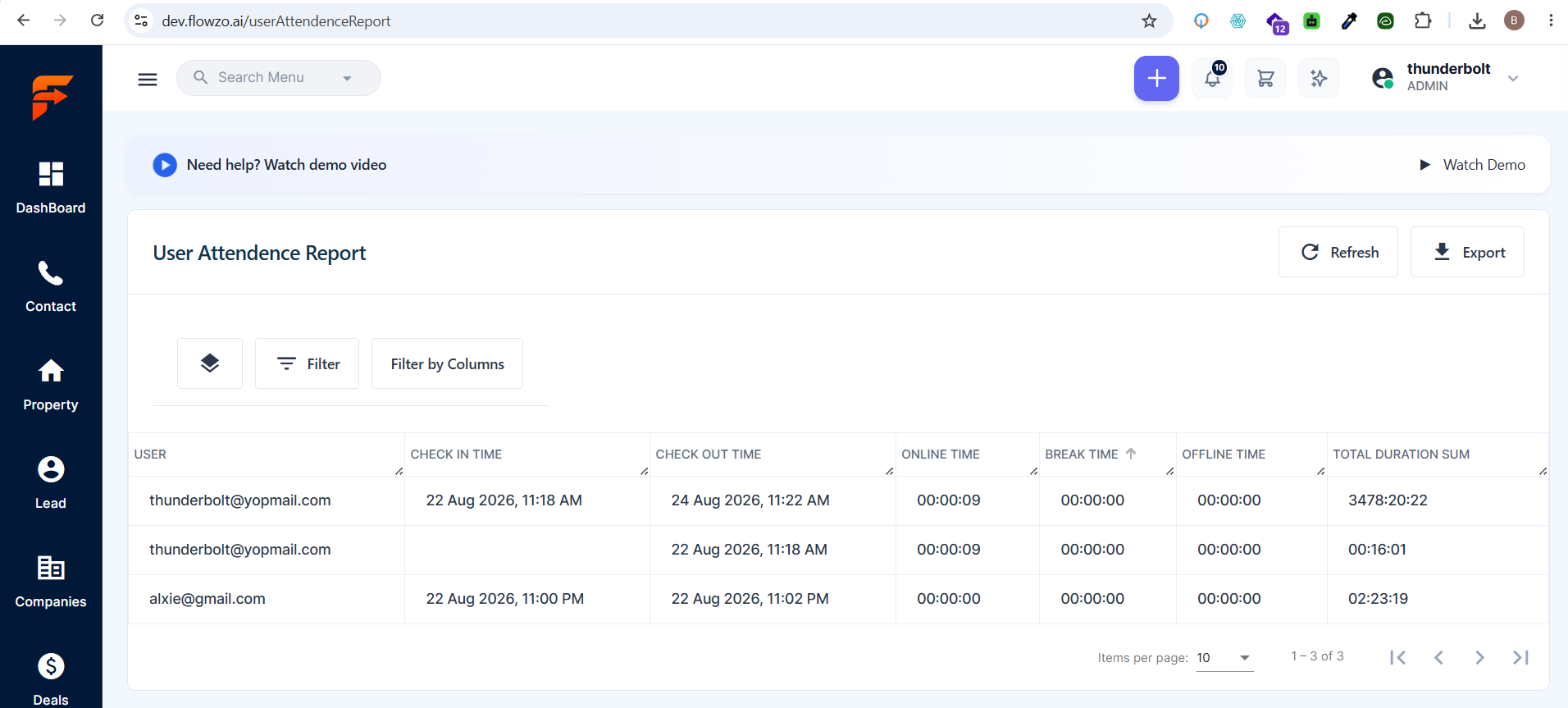
openUser Attendance Report – Duration Data Showing Incorrect Values
0%
Description
Precondition:
Attendance records with Online Time, Break Time, Offline Time, and Total Duration are available.
Steps to Reproduce:
https://dev.flowzo.ai/userAttendenceReport
Login to the CRM website.
Navigate to User Attendance Report.
Select a user/date with attendance records.
Check the following fields:
Online Time
Break Time
Offline Time
Total Duration
Actual Result:
The duration values displayed in the report are incorrect. The Online Time, Break Time, Offline Time, and Total Duration are showing wrong data.
Expected Result:
The system should correctly calculate and display:
Online Time based on the user's actual online duration.
Break Time based on the actual break duration.
Offline Time based on the actual offline duration.
Total Duration based on the correct attendance duration.
thunderbolt@yopmail.com
Welcome@1235
Files
No data to display